Choosing data source for quotes
Overview
Quote quality is one of the biggest drivers of Portfolio Slicer report quality.
Portfolio Slicer needs historical quote data for every symbol that you track. This page explains how to choose a quote data source and how to validate that the extracted quotes are actually suitable for your workbook.
General Rules
When choosing a quote source, keep these rules in mind:
- every symbol that appears in the local
Quotesfolder and finalQuotes.csvfile should also exist in the ExcelSymboltable before you refresh the workbook - if you use
SymbolRenameinpsConfig.txt, the symbol should exist in Excel in its renamed final form - if you have symbols in Excel but no quotes for them, reports may still refresh but the symbol value will usually be missing or zero
- after running the quote-extract scripts, you must inspect the extracted files and confirm that the data really looks correct
That means you should not assume a symbol is configured correctly just because the script ran without crashing.
What to Check After Extracting Quotes
After running the scripts, review the files in the local Quotes folder and confirm:
- the minimum date is what you expect
- the latest date is recent enough
- the quote prices look reasonable
- the symbol naming matches what you want in Excel
If the price does not make sense, possible causes include:
- wrong symbol
- wrong market suffix
- a source that reports the value in a smaller unit such as pence instead of pounds
In some cases, you may need to use FactorHistory or FactorIntraday in psConfig.txt to scale values correctly in the final generated Quotes.csv file.
Also check the PSData folder and confirm that there is no error.txt file there after the scripts finish. If an error.txt file exists, it means problems were found in the final generated files. Do not refresh the Excel workbook until those issues are fixed.
Quote Source - Generated Quotes
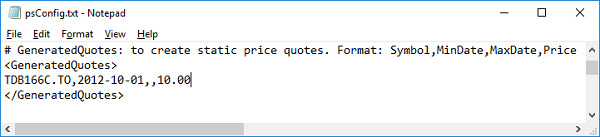
If you have symbols that always trade at a fixed price, such as certain guaranteed investment products, you can define them in the GeneratedQuotes section of psConfig.txt.
Example:
<GeneratedQuotes>
VidasGIC20170325,2014-03-25,,5000.00
TDB166C.TO,,,10.00
</GeneratedQuotes>
In this format:
Symbolis requiredMinDateis optionalMaxDateis optionalPriceis required
If MinDate is not supplied, the global MinDate from psConfig.txt is used.
If MaxDate is not supplied, the current date is used.
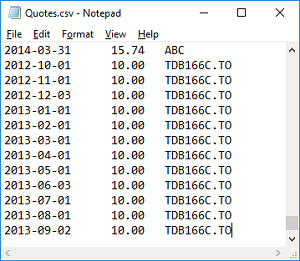
The script creates monthly quotes for these symbols and appends them to the final Quotes.csv file.
Quote Source - Yahoo Finance
Historically, Yahoo Finance has been one of the best quote sources for Portfolio Slicer because it was fast and supported historical quotes, intraday quotes, and dividends for many symbols.
To check whether Yahoo Finance can provide data for a symbol:
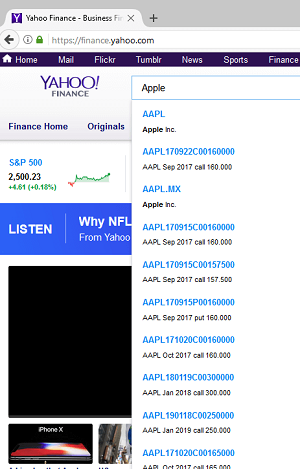
- Visit Yahoo Finance.
- Search for the ticker or company name.
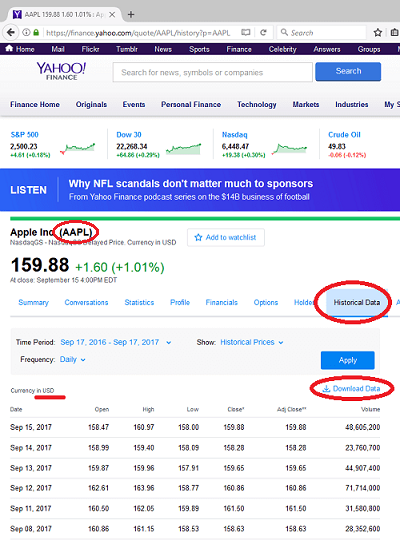
- Confirm the symbol used by Yahoo.
- Open the
Historical Datatab. - Confirm that daily quotes exist and that historical download or display is available.
Important notes:
- symbols outside North America often use a market suffix such as
.TOor.MX - Yahoo symbol naming may differ from the symbol naming you want in Excel
- if needed, use
SymbolRenameto convert the downloaded symbol to your Excel symbol name
Quote Source - Stooq
Stooq is another useful quote source, especially for many European and North American symbols.
To check whether Stooq supports your symbol:
- Visit Stooq.
- Search for the symbol or company name.
- Open the symbol page.
- Review the
Historical datasection. - Confirm that historical quotes can be viewed or downloaded.
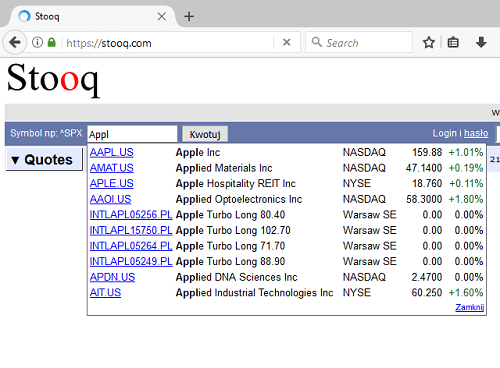
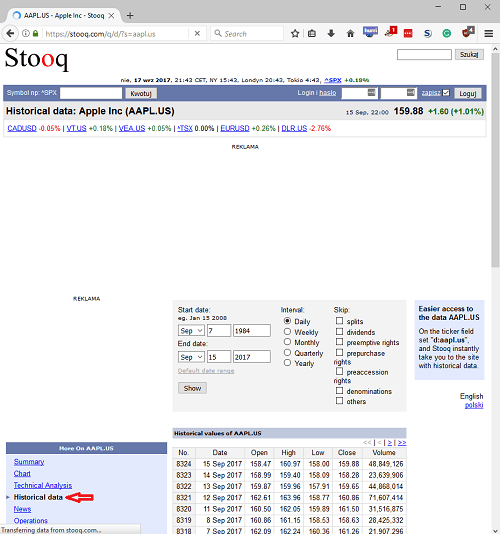
One important difference is that Stooq symbols often use a slightly different market suffix than Yahoo Finance. For example, a USA-listed symbol may appear as AAPL.US in Stooq instead of AAPL.
Quote Source - AlphaVantage
AlphaVantage is another possible quote source.
To use it, you need an API key from AlphaVantage.
Once you receive your key, add it to the AlphaVantageKey section of psConfig.txt.
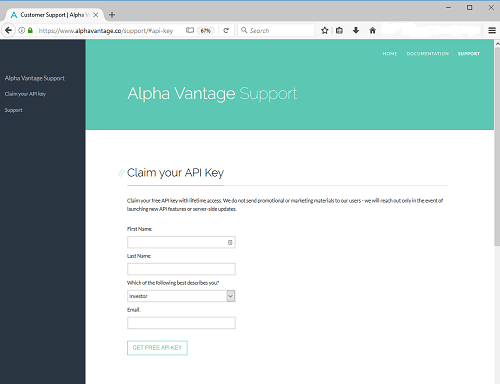
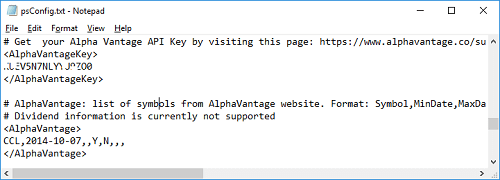
AlphaVantage does not provide as convenient a search interface as Yahoo Finance. In practice, the easiest test is often to add a symbol to the AlphaVantage section in psConfig.txt, run extraction, and see whether a quote file is created.
Google / GoogleWeb
These older source types existed in previous versions of the script workflow. Their usefulness depends heavily on the current state of the provider and the script version you are using.
If you use these sections, always test with only a few symbols first and inspect the generated local files before trusting the data.
How to Change the Quote Source Later
Sometimes you will need to replace a quote source for a symbol.
If the symbol name stays exactly the same between the old and new source, you can usually just move the symbol between source sections in psConfig.txt.
If the symbol name changes between sources, then you have more work to do.
Typical options are:
- re-extract all data from the new source
- rename the existing local quote files and change the symbol strings inside them
- split old and new history between sources and combine them using
SymbolRename
When changing sources, the most important goal is to make sure the final Quotes.csv file:
- does not contain duplicate symbol/date records
- uses one consistent final symbol name
- still matches the
Symboltable in Excel
Practical Advice
- research each symbol separately
- validate quote extraction one symbol at a time at first
- inspect both the local quote files and the final
Quotes.csv - do not refresh Excel if the generated files have known errors