How quote data is stored locally
Overview
This page describes how local quote data is stored by the External Data Management Scripts before the final Quotes.csv file is assembled.
This is useful when you want to:
- troubleshoot missing quotes
- understand how quote history is stored locally
- repair or rebuild quote files
- understand what the archive quote files are for
Quote Data Location
When the quote-extract scripts run, they download quote data from one or more internet sources and store it locally in the Quotes folder under your data root.
The location is controlled by the DataRootFolder parameter in psConfig.txt.
If DataRootFolder is not specified, the default is a relative parent folder such as ..\, which means the data folder is created relative to the scripts folder.
Examples:
- If your scripts are stored in
C:\PortfolioSlicer\ScriptsandDataRootFolderis empty, then quote files will normally be stored inC:\PortfolioSlicer\Quotes. - If your scripts are stored in
C:\PortfolioSlicer\ScriptsandDataRootFolderisC:\OneDrive\PortfolioSlicer\, then quote files will normally be stored inC:\OneDrive\PortfolioSlicer\Quotes.
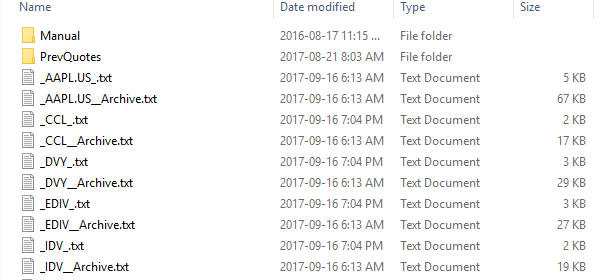
Quote File Naming
The Quotes folder normally contains 2 files for each symbol:
- a main quote file:
_Symbol_.txt - an archive quote file:
_Symbol__Archive.txt
If a symbol contains special characters such as :, ^, or &, those characters are replaced with _ in the file name.
Examples:
CCLbecomes_CCL_.txtTSE:XEIbecomes_TSE_XEI_.txtABC.Lbecomes_ABC.L_.txt
If quote archiving is disabled in psConfig.txt, then the _Archive.txt file may not be created.
How Quote Files Are Structured
The local quote files normally contain comma-separated values and usually do not have a header row.
A typical record looks like this:
2014-12-31,2058.899902,^GSPC
2015-01-30,1994.989990,^GSPC
2015-02-27,2104.500000,^GSPC
These local files are later combined and transformed into the final Quotes.csv file that Portfolio Slicer loads.
Quote Archiving
The scripts normally store daily quotes locally, but Portfolio Slicer reports do not need full daily history for all older dates.
In practice, Portfolio Slicer mainly needs:
- daily quote data for recent history
- monthly quote data for older periods
That is why there is a script that can reduce older daily history in the main quote files and move older detailed records into archive files.
The main settings that affect this behavior are:
ArchiveQuotesIncludeQuoteArchiveFolder
ArchiveQuotes
When ArchiveQuotes is Yes, the script will archive older quotes.
When it is No, the archive quote files are not used.
IncludeQuoteArchiveFolder
When IncludeQuoteArchiveFolder is Yes, archived quotes are included when the final Quotes.csv file is created.
When it is No, archived quotes are ignored during final file creation.
How Quote Data Is Updated
When new quotes are downloaded, the scripts normally append them after the latest quote date already stored in the symbol file.
That means:
- if the file already contains recent data, only newer records are added
- if some dates in the middle are missing, the scripts will not automatically repair that gap unless later data is removed first
For example, if your quote file contains data up to 2017-09-19, but all of August 2017 is missing, then you may need to delete records from 2017-08-01 onward and re-run the extract so the script can rebuild that missing period.
What Happens If MinDate Changes
If you change MinDate, existing local quote files are not automatically rebuilt from scratch.
That means:
- if the new
MinDateis earlier, the missing older history will not automatically appear - if the new
MinDateis later, existing older quotes will not automatically be removed
If you make a significant MinDate change, it is often best to back up the existing quote files, remove the old local quote files, and re-run the quote extraction.
Practical Advice
- always back up your local quote files
- consider storing them in a cloud-synced folder such as OneDrive, Dropbox, or Google Drive
- inspect the raw files when troubleshooting missing symbols or dates
- test quote extraction with only a few symbols first
- do not assume that a successful script run means every symbol has valid quote history