Choosing data source for currency exchange
Overview
If all symbols in your portfolio use the same currency, then you do not need currency exchange data and can safely ignore this page.
But if your portfolio uses more than one currency, or if you compare your portfolio to an index in another currency, then you need exchange-rate data.
Configuring What Source to Use
In psConfig.txt there is one section named Currency where you list the currency codes you want to support.
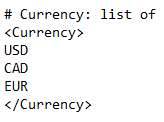
The same section is used by all currency exchange scripts.
To choose which source to use, you normally edit UpdatePSData.bat and enable or disable the relevant exchange-rate scripts.
For example, a batch file may contain lines like these:
REM powershell -ExecutionPolicy Bypass .\Scripts\GetExchRates-BoC.ps1
REM powershell -ExecutionPolicy Bypass .\Scripts\GetExchRates-ECB.ps1
powershell -ExecutionPolicy Bypass .\Scripts\GetExchRates-Stooq.ps1
powershell -ExecutionPolicy Bypass .\Scripts\GetExchRates-YahooIntraday.ps1
If a line starts with REM, that line is treated as a comment and does not run.
In practice, this means you choose your main historical exchange-rate source by uncommenting one script and disabling the others.
Keep the intraday script enabled if you want intraday values when available.
Currency Exchange Data Source - Stooq
Stooq is one of the better general sources for currency exchange data.
To test whether it supports a pair you need:
- Visit Stooq.
- Search for a pair such as
CADUSD. - Open the pair page.
- Confirm that exchange-rate data is shown.
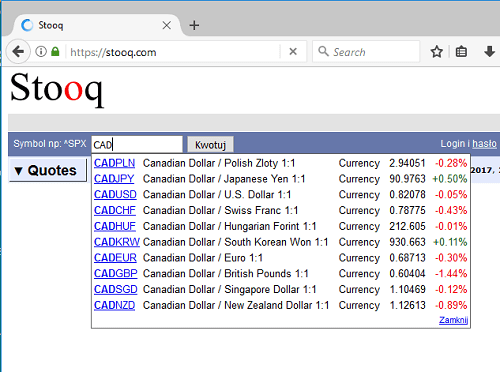
Stooq can also provide data through URLs for specific date ranges.
Currency Exchange Data Source - European Central Bank (ECB)
The European Central Bank provides downloadable historical exchange-rate data and supports many currencies.
This can be a useful historical source, especially when your required currencies are among those supported by ECB.
Currency Exchange Data Source - Yahoo Finance Intraday
Yahoo Finance has historically been useful for intraday exchange rates, even when another source is used for historical currency data.
To test whether a pair is supported, search Yahoo Finance for a code such as:
CADUSD=XUSDEUR=X
If Yahoo shows a page with an exchange rate, it can usually be used for intraday extraction for that pair.
Currency Exchange Data Source - Bank of Canada (BoC)
Bank of Canada can also provide exchange-rate data for a useful set of currencies.
Historically, however, this source became less suitable for long history in some cases because older exchange-rate coverage changed over time.
That means it can still be useful, but you should validate the date range you actually need.
Practical Advice
- if possible, choose one main historical source and stay consistent
- keep the intraday source separate in your thinking from the main historical source
- validate a few currency pairs manually before trusting the whole setup
- confirm that the resulting exchange-rate history starts early enough for your
MinDate