Symbol Table
Overview
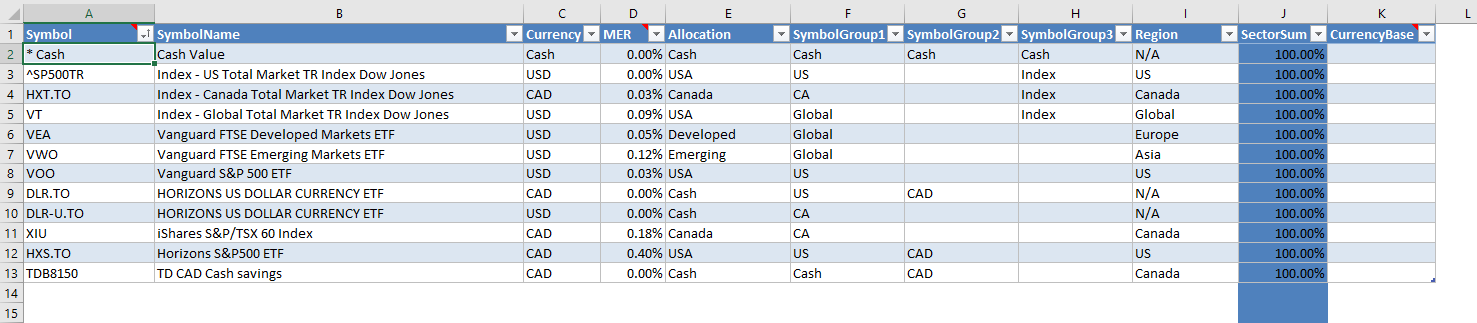
The Symbol table defines the investments Portfolio Slicer knows about. When these records are matched with records in Quotes.csv, Portfolio Slicer can calculate your investment value at any point in time.
This table has a special symbol, * Cash, that is used for cash transactions such as deposits, withdrawals, bank fees, and interest received. You should leave that first row as is.
Any symbol values that are used in the Allocation table column Index or the CompareTo table column Symbol should also be added to this Symbol table.
How you choose Symbol value
The value you use as Symbol should match the Symbol column in Quotes.csv exactly. In practice, the symbol value depends on your quote source provider, so you will need to match the provider’s naming exactly.
For example, suppose you have Toronto-Dominion Bank, traded on the Toronto Stock Exchange. If your quote provider is Yahoo Finance, then your symbol would be TD.TO.
But if you get quotes for the same symbol from Google Finance, then your symbol would be TSE:TD.
And if you get quotes from some other financial data company, the same symbol could be TD:TSE or Toronto:TD.
Most USA stocks and ETFs do not need a suffix or prefix, so they are often the same across the majority of quote providers.
To add flexibility to symbol naming, the configuration file psConfig.txt has a parameter section SymbolRename that allows you to apply renaming to symbol values in the Quotes.csv file.
For example, if in the psConfig.txt section Yahoo you have symbol HXS.TO, and in the SymbolRename section you add line HXS.TO,HXS, then when the file Quotes.csv is created, all HXS.TO values will be replaced with HXS.
In such a case, in this Symbol table you would define the Symbol value as HXS.
Table Columns
Symbol- your investment short code, symbol, or ticker. It should match theSymbolcolumn in Quotes.csv exactly.SymbolName- a descriptive name for the symbol.Currency- symbol currency. It must match one of the values in the Report Currency table. Otherwise, the background will be red and calculations might not work properly.MER- Management Expense Ratio. This must be a numeric value expressed in percent. Example:0.40%. This information is used to calculate the approximate amount you pay as fees, usually hidden, for mutual funds or ETFs.Allocation- symbol assigned allocation. It must match one of the values in the Allocation table, otherwise the background will be red.SymbolGroup1- custom grouping field.SymbolGroup2- custom grouping field.SymbolGroup3- custom grouping field.Region- region that you want to assign this symbol to. This value can be used for custom grouping.SectorSum- calculated field that shows the symbol summary ofPercentvalues in the SymbolSector table. It should be used to confirm that values add up to 100%.CurrencyBase- not implemented.
Practical Advice
- keep symbol naming consistent across Excel and the external files
- if a value is numeric and unknown, it is often safer to enter
0than to leave it blank - validate new symbols with a small test refresh before adding many more
- if a provider uses a different symbol naming convention, use rename logic or alias logic consistently
Important Reminder
Keep the symbol naming consistent across:
- the Symbol table
- quotes data
- transactions
- any alias or rename logic you use
This is one of the most common causes of missing or incorrect data in reports.