Currency Exchange Rates File - CurrencyConv.csv
Overview
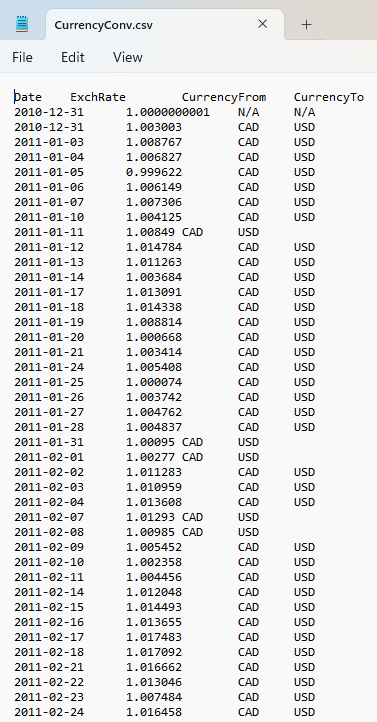
CurrencyConv.csv contains the exchange rates Portfolio Slicer uses to convert values between currencies.
Provides currency conversion history used for multi-currency reporting.
Without correct exchange-rate data, multi-currency reports will not produce reliable results.
File source
This file is create by PowerShell script PSDataExtract\Scripts\psMakeAllDataFiles.ps1.
All data for this file comes from the PSDataExtract\CurrExch\*.txt and PSDataExtract\CurrExchIntraDay\*.txt folders.
File Structure
The file is expected to contain rows with:
DateExchRateCurrencyFromCurrencyTo
The first row is the header.
Core Requirements
A valid CurrencyConv.csv should:
- have a header row
- contain valid date values in
YYYY-MM-DDformat - contain valid numeric exchange-rate values
- use currency codes that match the Report Currency table
- avoid duplicate
Date + CurrencyFrom + CurrencyTorows - cover the historical period Portfolio Slicer needs
Single-Currency Use Case
If your setup effectively uses only one currency, then your local currency-exchange folder may be empty.
But the final generated file may still include the placeholder first record, depending on the workflow used by your scripts.
Practical Advice
- keep the currency codes consistent everywhere
- make sure every required currency pair is covered
- confirm the file spans the date range your reports need
- if conversion looks wrong, inspect this file before assuming the workbook logic is broken